


 PDF Version Demo
From your first practice question to exam day, Getcertkey covers the entire 070-331 journey: a free demo, 228 practice questions in three formats, a full year of free updates, and a clear refund policy. Preparing for the Microsoft Core Solutions of Microsoft SharePoint Server 2013 exam has rarely been this straightforward.
Microsoft 070-331 Exam Overview:
| Certification Vendor: | Microsoft |
|---|---|
| Exam Name: | Core Solutions of Microsoft SharePoint Server 2013 |
| Exam Number: | 70-331 |
| Real Exam Qty: | 40-60 |
| Passing Score: | 700 / 1000 |
| Exam Price: | USD 165 (varies by region) |
| Certificate Validity Period: | Retired (no longer available; formerly part of MCSE: SharePoint 2013 track) |
| Available Languages: | Simplified Chinese, Spanish, French, German, Portuguese (Brazil), Japanese, English |
| Exam Duration: | 150 minutes |
| Related Certifications: | MCSE: SharePoint Microsoft SharePoint Server 2013 certification track |
| Exam Format: | Multiple response, Drag and drop, Multiple choice, Case studies |
| Recommended Training: | Official Microsoft SharePoint documentation Microsoft Learn (SharePoint Server 2013 resources) |
| Exam Registration: | Pearson VUE Microsoft Exams Microsoft Certification Portal (retired exams) |
| Sample Questions: |  |
| Exam Way: | Computer-based exam delivered at Pearson VUE test centers or online proctored (historically during active period). |
| Pre Condition: | Recommended experience with SharePoint Server 2010/2013 administration and basic Windows Server and SQL Server knowledge. |
| Official Syllabus URL: | https://learn.microsoft.com/en-us/credentials/certifications/retired-certifications |
Microsoft 070-331 Exam Syllabus Topics:
| Section | Objectives |
|---|---|
| Monitoring, maintenance, and troubleshooting | - Monitor SharePoint environment
|
| Installing and configuring SharePoint farms | - Configure core services
|
| Designing a SharePoint 2013 environment | - Plan SharePoint logical and physical architecture
|
| Upgrade and migration | - Migrate from previous versions
|
| Managing SharePoint services and content | - Manage authentication and security
|
Common Questions About the Microsoft 070-331 Exam
What is the Microsoft Core Solutions of Microsoft SharePoint Server 2013 exam all about?
The 070-331 exam is the official Microsoft exam behind the MCSE: SharePoint (legacy) certification, validating the skills measured by the Microsoft Core Solutions of Microsoft SharePoint Server 2013 credential. It sits at the Professional level of the Microsoft certification program. It also connects to MCSE: SharePoint, Microsoft SharePoint Server 2013 certification track, so the knowledge you build here carries over to those tracks as well.
How many questions are on the 070-331 exam, and how much time do I get?
The 070-331 exam contains 40-60 questions to be completed within 150 minutes. Before exam day, divide the available time by the question count to work out a comfortable per-question pace, and mark any item that eats into it so you can return later instead of getting stuck. Timed sessions in the Getcertkey test engines make that pacing automatic — run at least two full-length mock exams under the clock so time pressure never becomes the reason you drop points.
What score do I need to pass the 070-331 exam, and what does it cost?
The passing score for the 070-331 exam is 700 / 1000, and the official registration fee is USD 165 (varies by region). Retakes are not discounted — every new attempt means paying the full fee again — so it pays to measure yourself before you book. Work through the 228 practice questions on Getcertkey, sit a timed practice test, and schedule your exam only when your scores are consistently comfortable. That simple habit is the cheapest exam strategy there is.
Are there any prerequisites for the 070-331 exam?
Recommended experience with SharePoint Server 2010/2013 administration and basic Windows Server and SQL Server knowledge. Requirements can change when Microsoft revises its certification program, so confirm the current eligibility rules on the official exam page before you register.
How do I register for the 070-331 exam?
You can book the Microsoft Core Solutions of Microsoft SharePoint Server 2013 exam through the official registration channels below:
As for delivery, the exam is offered in the following format: Computer-based exam delivered at Pearson VUE test centers or online proctored (historically during active period).. Choose the option that suits you best when you book your seat.
What official training is recommended for the 070-331 exam?
Microsoft recommends the following training resources for the Microsoft Core Solutions of Microsoft SharePoint Server 2013 exam:
Official courses build the foundation; the 228 practice questions from Getcertkey then show you how that knowledge is examined, so the two work best together.
Can I try the 070-331 practice questions before I buy?
Yes. Getcertkey provides a free 070-331 PDF demo so you can review the question style and answer quality before purchasing. Every purchase also includes 365 days of free updates — if Microsoft revises the exam during that period, the updated material reaches you at no cost. Once the free-update year ends, you can extend your update service at a 50% discount.
What if I fail the 070-331 exam, and how is my order delivered?
Every Microsoft Core Solutions of Microsoft SharePoint Server 2013 purchase on Getcertkey is covered by a 100% money-back guarantee with clear conditions: if you take the corresponding exam within 60 days of your purchase and do not pass, you can claim a full refund by submitting a scanned copy of your exam enrollment slip and your official score report as a PDF within two days of the exam date; claims are processed within seven days of submission. The guarantee does not apply to exams taken within three days of purchase, to material that was downloaded but never used in an exam attempt, or to free products and expired orders, and the candidate name must match the payer name. If you would rather not take a refund, you can instead exchange your purchase for two free exam preparation products of equal value and keep the update service on your original product.
Delivery is instant: your download is sent to your email within one minute of payment, with no limit on how many computers you may install the material on. If nothing arrives within two hours, check your spam folder and contact customer service for help.
What topics are covered in the 070-331 exam?
The Microsoft Core Solutions of Microsoft SharePoint Server 2013 exam blueprint is organized into 5 domains. The first three are:
- Installing and configuring SharePoint farms
- Designing a SharePoint 2013 environment
- Upgrade and migration
For the complete domain-by-domain breakdown, scroll up to the full exam topics outline above and use it to plan how you distribute your study time.
Microsoft Core Solutions of Microsoft SharePoint Server 2013 Sample Questions:
Question #1
DRAG DROP
You have a SharePoint Server 2013 server farm.
You need to recommend which tools must be used to identify the causes of the following issues:
- Some users report that a specific Web Part page takes longer than 60 seconds to load. - A user reports that a document that was uploaded to a site does not appear in search results.
Which tool should you recommend for each issue? (To answer, drag the appropriate tools to the correct issues. Each tool may be used once, more than once, or not at all. You may need to drag the split bar between panes or scroll to view content.)
Question #2
DRAG DROP
You are the administrator of a SharePoint farm. The search index for the farm contains approximately 10 million items.
Performance reports indicate that search queries have high latency times and content crawls are slow. You add a new SharePoint server to the farm.
You need to configure the new server to add a new index component to the search topology.
Which four actions should you perform in sequence? (To answer, move the appropriate actions from the list of actions to the answer area and arrange them in the correct order.)
Question #3
You are managing a site collection in a SharePoint farm.
You need to configure the minimum level of permissions necessary for users to manage lists in the site collection.
What permission level should you configure?
A. Limited Access
B. Contribute
C. Edit
D. Read
Question #4
HOTSPOT
You have a SharePoint server 2013 server farm.
Users report that the past week, some pages were slow to render.
You need to identify the 10 pages in the farm that take the longest to load.
Which link should you select? (To answer, select the appropriate link in the answer area.)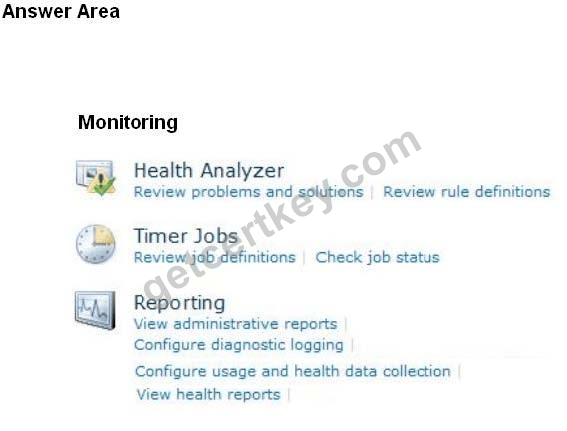
Question #5
HOTSPOT
A company plans to implement hybrid search results in SharePoint Server 2013.
You need to configure a SharePoint hybrid environment so that user searches from the SharePoint Server 2013 Search Center display results from both the SharePoint Server 2013 and SharePoint Online search indexes.
Which products should you implement? To answer, select the appropriate product from each list in the answer area.
Solutions:
| Question #1 Correct Answer: Only visible for members | Question #2 Correct Answer: Only visible for members | Question #3 Correct Answer: C | Question #4 Correct Answer: Only visible for members | Question #5 Correct Answer: Only visible for members |
 1052 Customer Reviews


 Quality and ValueGetCertKey Practice Exams are written to the highest standards of technical accuracy, using only certified subject matter experts and published authors for development - no all study materials.
 Tested and ApprovedWe are committed to the process of vendor and third party approvals. We believe professionals and executives alike deserve the confidence of quality coverage these authorizations provide.
 Easy to PassIf you prepare for the exams using our GetCertKey testing engine, It is easy to succeed for all certifications in the first attempt. You don't have to deal with all dumps or any free torrent / rapidshare all stuff.
 Try Before BuyGetCertKey offers free demo of each product. You can check out the interface, question quality and usability of our practice exams before you decide to buy.